# 账户设置

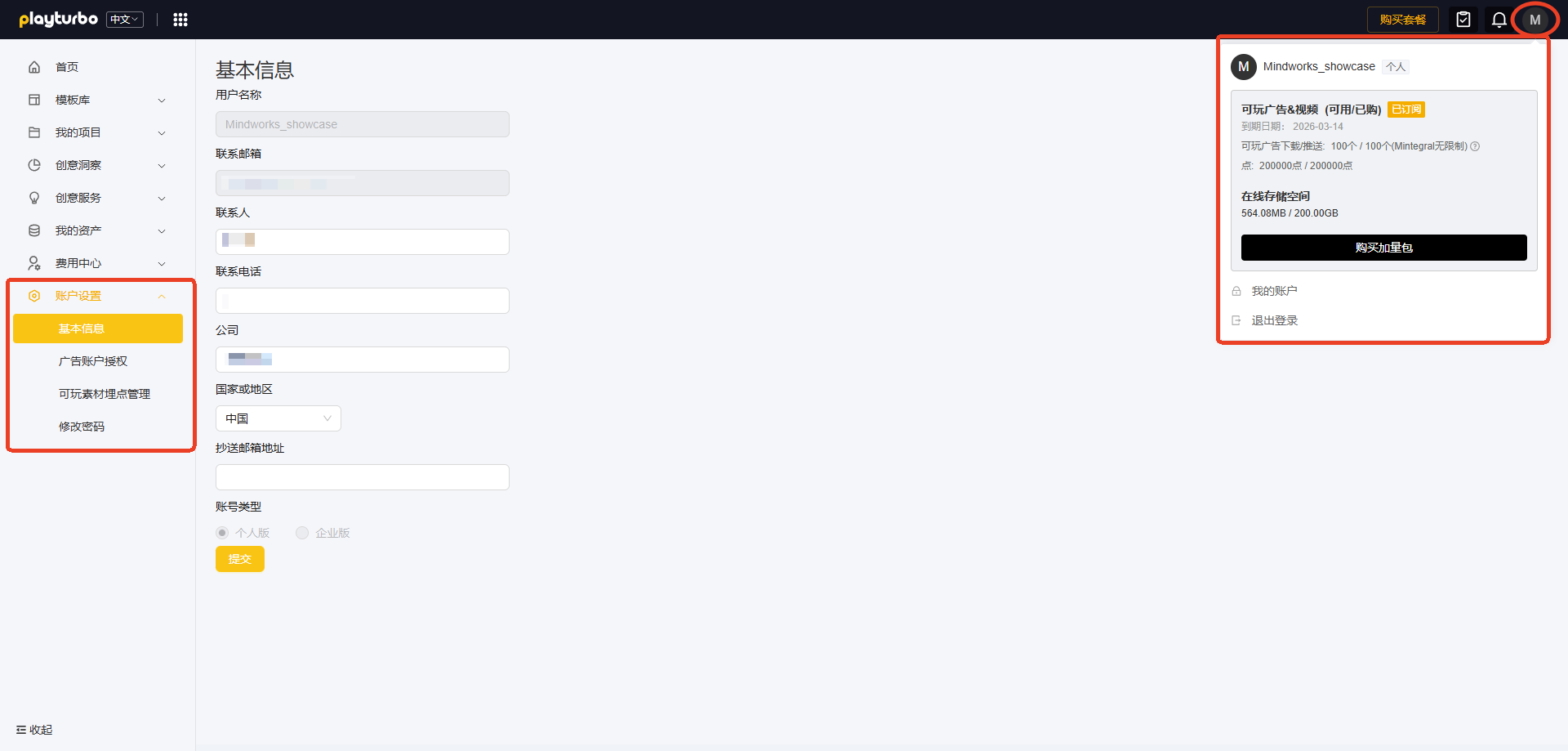
鼠标悬浮在右上角头像，可快速查看套餐详情及AI服务的总量和余量，以及到期时间

进入【账户设置】模块，可对账户进行相关设置

<figure><img src="/files/mnY3gM7JGoF4ALqTW8qx" alt=""><figcaption></figcaption></figure>

## <mark style="color:blue;">一、基本信息</mark>

* 支持修改账号基本信息，如联系人/联系电话/公司名称/国家/抄送邮箱地址
* 抄送邮箱地址支持添加多个，用于接收来自Playturbo的消息通知

## <mark style="color:blue;">二、广告账户授权</mark>

[广告账户授权与素材推送](/su-cai-dao-chu-tou-fang-xiang-guan-wen-dang/guang-gao-zhang-hu-shou-quan-yu-su-cai-tui-song.md)

## <mark style="color:blue;">三、可玩素材埋点管理</mark>

换肤编辑器： [换肤编辑器 -下载&推送](/ke-wan-gong-ju-huan-fu-bian-ji-qi/huan-fu-bian-ji-qi-shi-yong-zhi-nan/huan-fu-bian-ji-qi-xia-zai-tui-song.md#si-ke-wan-su-cai-mai-dian-guan-li)

自由编辑器： [自由编辑器 - 下载&推送](/ke-wan-gong-ju-zi-you-bian-ji-qi/zi-you-bian-ji-qi-shi-yong-zhi-nan/zi-you-bian-ji-qi-xia-zai-tui-song.md#wu-ke-wan-su-cai-mai-dian-guan-li)

## <mark style="color:blue;">四、修改密码</mark>

填写【当前密码】与【新密码】，即可修改账号密码

<div align="left"><figure><img src="/files/VxOfJFRGtJ4aiLt0JZ2M" alt=""><figcaption></figcaption></figure></div>

💡<mark style="color:red;">**若您登录遇到"密码错误/wrong password"的提示**</mark>：

* 请首先确认您输入的密码是正确的；
* 或可联系贵司运营同学，确认是否有修改 Mintegral 平台的密码，因为这会联动Playturbo的密码一起被修改（在Mintegral平台重置密码时，需确保重置的账号和Playturbo账号完全一致）；
* 若仍登录失败，可通过您账号的注册邮箱**重置密码**

<div align="left"><figure><img src="/files/ZNBjANDrJgo1DuUBsHMJ" alt="" width="425"><figcaption></figcaption></figure></div>

💡Playturbo对登录的设备数量是没有要求的，仅对"**同时在线用户数**"有限制（依据套餐的内容决定）。若您在不同的设备上登录失败，请先确认"同时在线的数量"；或重置密码后重新登录。若仍有问题，请联系您的AM。


---

# Agent Instructions: Querying This Documentation

If you need additional information that is not directly available in this page, you can query the documentation dynamically by asking a question.

Perform an HTTP GET request on the current page URL with the `ask` query parameter:

```
GET https://doc.playturbo.cn/ge-ren-zhong-xin/zhang-hu-she-zhi.md?ask=<question>
```

The question should be specific, self-contained, and written in natural language.
The response will contain a direct answer to the question and relevant excerpts and sources from the documentation.

Use this mechanism when the answer is not explicitly present in the current page, you need clarification or additional context, or you want to retrieve related documentation sections.